Why Multi-Office Independent Brokerages Are Rethinking Real Estate Asset Management Software
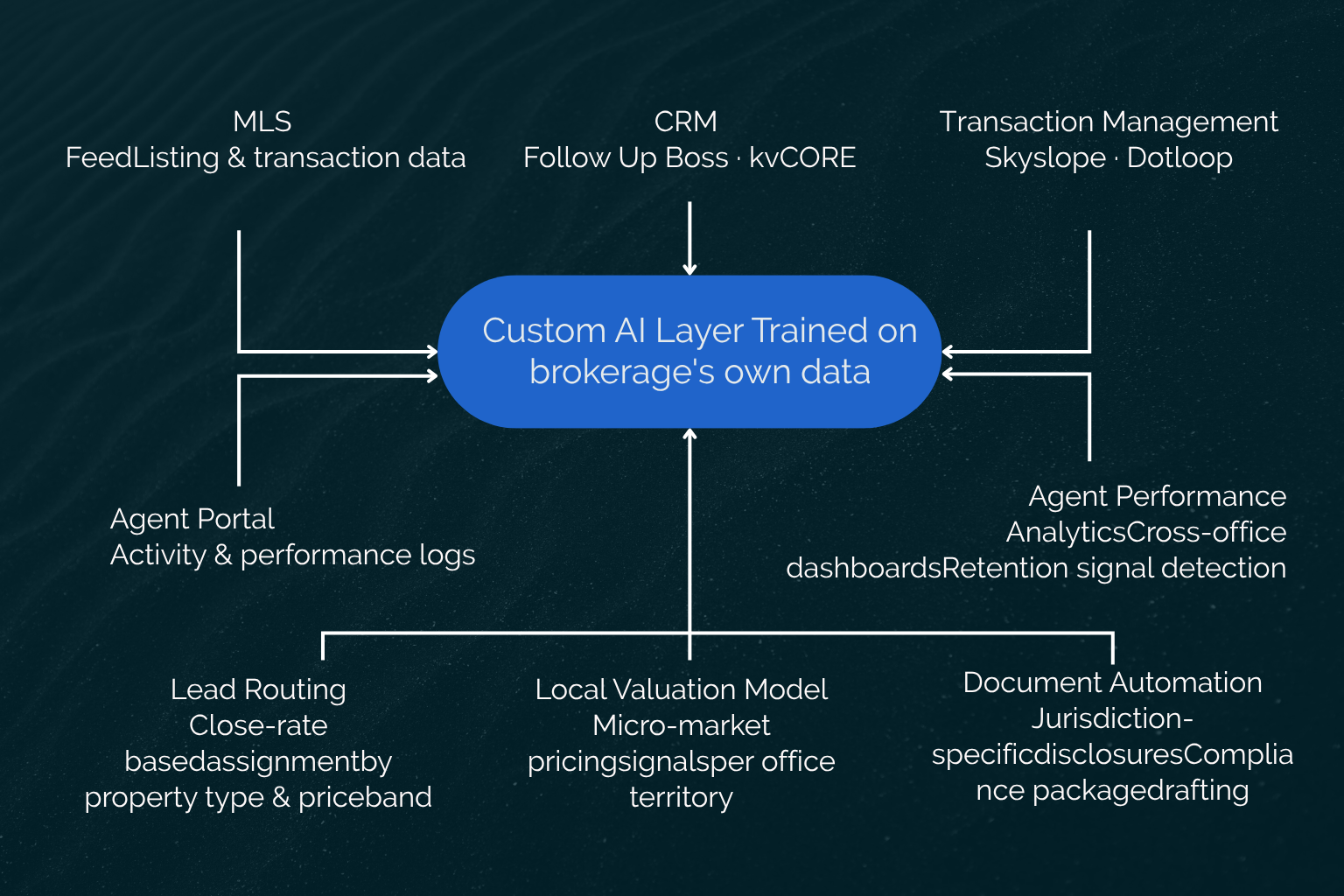
Running a multi-office independent brokerage means owning the brand, the data, and the technology decisions simultaneously, often without an IT department or the time to properly evaluate every technology decision. The tools you're running today, whether it's a CRM, transaction platform, MLS integration, agent portal, or commission management system, were each chosen to solve a specific problem. None were designed to work as a unified system, and the intelligence across them remains fragmented.
That fragmentation was tolerable when competitors were in the same position. It's harder to absorb now that platform-native brokerages have spent hundreds of millions building unified tech stacks, and the gap in operational capability is becoming visible to the agents you want to recruit.
If you're managing multiple offices, you've likely experienced the limits of stitching together systems that were never designed to work together. As brokerages grow, the challenge is no longer finding software with enough features. It's building a technology stack that matches how the business actually operates and keeps your data working for you.
The Real Problem with Off-the-Shelf Real Estate AI Platforms
The problem with generic real estate software is not that it lacks features. Most platforms have more features than any brokerage will use. The problem is that the assumptions baked into those tools were built for a different operation than yours.
A SaaS CRM assumes a relatively flat team structure with leads coming from a consistent set of sources. A transaction management platform assumes deals flow through a single compliance workflow.
Neither assumption holds for a brokerage running three to seven offices with different MLS feeds, different managing brokers, and agent performance data scattered across locations because two of those offices came from an acquisition and still run their original tools.
What "Platform Graduation" Actually Means for a Multi-Office Brokerage
Platform graduation is the point at which a brokerage's operational complexity has outgrown the assumptions built into the tools it chose when it was simpler. The signals are specific: you're trying to pull agent performance across three offices and getting three different reports from three different systems with no clean way to reconcile them. You acquired another office and their deal pipeline lives in a CRM that doesn't sync with yours. Your lead routing logic has been overridden so many times by manual exceptions that the automation isn't actually running. You have a compliance workflow that works for your downtown office but breaks for the suburban location because county-level disclosure requirements differ.
None of these are software feature problems. They're architectural mismatches between what the tools were designed for and how your brokerage actually operates.
How Compass AI Changes the Competitive Stakes
Compass has continued deepening its AI capabilities, with the June 2025 release introducing a proactive, voice-activated AI assistant that enables agents to draft emails, create follow-ups, develop marketing collateral, and manage client communications hands-free. The company reports having invested $1.6 billion in its technology platform, which now connects agents to clients through every phase of the transaction in a single environment.
The operational gap this creates for independent brokerages is not about individual features. It's about cohesion. A Compass agent works inside one platform where lead routing, CRM, transaction management, and client-facing communication are architecturally connected and trained on the same data lake. An agent at your independent brokerage works across Follow Up Boss, Skyslope, your IDX website, and a spreadsheet for agent performance tracking. When that Compass agent considers a move to your brokerage, they're evaluating whether the operational environment they'd be joining is comparable to what they're leaving.
The counter-move is not to replicate Compass's platform. It's to build AI on top of your own data and your own workflows, so the intelligence compounds inside your operation rather than inside a platform you'd have to pay to access.
What AI Software for Real Estate Can Actually Do Across Multiple Offices
The four areas below represent where AI produces measurable operational improvement for multi-office brokerages, grounded in the specific integration types and workflow mechanics involved, not in generic capability claims.
AI-Powered Lead Routing and Pipeline Intelligence
When a Zillow or Realtor.com lead arrives, most brokerage CRMs route it using simple round-robin logic or geographic assignment rules. Neither approach accounts for the fact that agent close rates vary significantly by property type, price band, and neighborhood. An agent with a strong track record on multi-family properties in the northern suburbs will outperform a generalist agent on that lead type, but round-robin routing treats them identically.
Machine-learning routing logic built on a brokerage's own transaction history can assign inbound leads based on historical close rates across those dimensions. The integration layer sits on top of the existing CRM rather than replacing it: the lead lands in Follow Up Boss or kvCORE as it normally would, but the assignment logic is driven by a model trained on the brokerage's own deal history rather than a generic rule set. The routing decisions are also logged, which means the system improves as more transactions close and the patterns become sharper.
This requires building on the brokerage's own data, which is precisely why it can't be replicated by a platform whose AI was trained on a different brokerage's transactions.
Automated Valuation and Market Intelligence at the Local Office Level
National AVM tools like Zillow's Zestimate aggregate data across broad geographies, which is useful for general market direction and poor for pricing decisions in specific sub-markets. A neighborhood where most properties have been renovated in the past five years will have appreciation patterns that differ substantially from the adjacent neighborhood with older inventory, and a national model collapses that distinction in the averaging process.
A valuation model trained on a brokerage's own transaction data produces pricing signals calibrated to each office's specific micro-market: what properties of a given type, age, and configuration have actually sold for in that zip code in the past 18 months, as closed by this brokerage's agents. The output gives listing agents a credible starting point for seller conversations that reflects the hyperlocal patterns a national tool ignores.
An important constraint worth stating plainly: this capability requires meaningful transaction volume in the specific sub-market to produce reliable signals. A brokerage with thin transaction history in a new territory will not get accurate output from a small dataset. The model needs to see enough comparable transactions to surface patterns rather than noise.
Document Automation and Compliance Workflows
For a brokerage operating across multiple counties or states, disclosure requirements and contract structures differ by jurisdiction. An agent closing a deal in a different county than their home office needs to know which disclosures apply and which fields are required, and verifying that manually is slow and error-prone.
AI workflow automation in this context does the following: it extracts required fields from the transaction record, generates the appropriate disclosure documents for the jurisdiction, flags missing items before submission, and routes the package for broker review. This is document workflow automation, not legal review. The agent still reviews the output. Compliance counsel still owns the legal interpretation. What changes is the administrative load: instead of an agent spending 45 minutes pulling together a disclosure package from a checklist, the system produces a draft in minutes that the agent and broker verify.
Across a multi-office operation, this compounds. The time saved per transaction multiplied by deal volume across locations becomes a material reduction in administrative hours. Those hours go to client-facing work.
Agent Performance Analytics Across Locations
The CRM market is projected to reach $128.97 billion by 2028, and businesses report an average return of $8.71 for every dollar invested in CRM technology. Yet those returns depend on having accessible, connected data. For many multi-office brokerages, agent activity, transaction history, and lead performance are still spread across multiple systems and locations, making it difficult to generate the insights that drive better decisions.
Custom dashboards built on a brokerage's own performance data can surface office-level and agent-level signals that generic aggregated tools miss. Time-to-close by agent and property type, conversion rates by lead source, the activity patterns that correlate with deal outcomes across offices. These are the signals a managing broker actually needs to have a productive conversation with an underperforming agent, and none of them are available in a useful form when the underlying data is split across three platforms.
One concrete example worth highlighting is predictive retention signals. An agent who is planning to leave typically shows activity pattern changes before they announce anything: fewer logins to the CRM, reduced lead follow-up cadence, lower listing activity. A model trained on historical agent departure data at the brokerage can identify when a current agent's activity pattern resembles the pattern that preceded past departures, giving the principal time to have a retention conversation before the decision is made. Whether that signal fires accurately depends entirely on the quality and completeness of the brokerage's own historical data, which is another reason why data ownership is the strategic argument, not just a compliance consideration.
Custom AI Software vs. SaaS Platforms: The Real Trade-Offs for Independents
The choice between continuing to layer SaaS subscriptions and commissioning a custom AI build is not primarily a technology decision. It's a financial and strategic one, and it depends on four dimensions that play out differently depending on the brokerage's size, complexity, and growth trajectory.
On total cost of ownership, the SaaS path looks cheaper at the line-item level until you add up what's actually running. Teams and brokerages on all-in-one CRM platforms alone spend $300 to $1,500 per month. Add transaction management at $340 per month or more for brokerage-level access, a lead management or IDX platform, an agent portal, and a commission tracking tool, and a multi-office brokerage can be spending $3,000 to $6,000 per month across tools that don't share data cleanly.
The custom alternative is a setup fee plus a fixed monthly managed-service subscription with infrastructure, API costs, and hosting bundled, no separate invoices. Whether the math favors custom depends on that total SaaS spend and on how much staff time goes to maintaining integrations and reconciling data across platforms. The breakeven point is different for every brokerage, and the back-of-envelope version is straightforward: add up your current monthly SaaS subscriptions, add an honest estimate of the hours your ops team spends each month managing platform gaps, and compare that total against what a managed custom engagement would cost.
On data sovereignty, the SaaS path means your transaction history, agent performance records, and client interaction data live in the vendor's infrastructure. When you sign a platform contract, the data is nominally yours but operationally theirs. If you migrate, you take a data export that may or may not contain everything in a form that's useful for training models. A custom build runs on infrastructure configured around your brokerage, with your data handled according to terms you negotiated and stored in a way that doesn't reset if you change vendors.
On integration flexibility, SaaS platforms connect to each other through the integrations each vendor chose to build. When a new MLS region comes in because you opened a new office, you're at the mercy of whether your CRM has a connector for that region's feed. A custom API-first architecture is built to extend: new MLS feeds, new offices, new tools added through the same integration layer rather than through a separate vendor configuration process.
On time-to-value, SaaS wins for a simpler operation. If you're running one or two offices with a stable, linear workflow and a tool set that mostly communicates, the speed advantage of SaaS is real. The inflection point where custom becomes the better decision is a function of operational complexity, the dollar amount of your current SaaS stack, and the strategic value of owning the intelligence that sits across your data.
Most brokerage principals are not in a position to run this analysis objectively on their own, partly because it requires an engineering lens to assess integration complexity, and partly because the vendor conversations around custom development rarely produce a neutral recommendation. A structured evaluation run by engineers who understand what an MLS feed contains, how CRM APIs behave, and what the actual integration complexity is for your specific stack gives you a defensible answer before any build commitment. Leanware's AI ROI Assessment takes two weeks, produces a ranked list of AI opportunities with ROI projections per workflow, and includes a build-vs-buy-vs-wait recommendation for each. Fifty percent of the evaluation fee is credited toward the build setup if you proceed within 30 days.
When the SaaS Subscription Cost Exceeds the Case for Custom
The tipping point for most multi-office independents is in a range that's practical to calculate. A brokerage with four offices, 60 active agents, and five disconnected SaaS tools running at $3,500 per month is spending $42,000 per year on software that doesn't produce unified intelligence. Add 10 to 15 hours per month of staff time managing integrations and reconciling data at a burdened rate of $35 to $50 per hour, and the true annual cost of the current stack is closer to $48,000 to $51,000.
A single-workflow custom agent at a mid-tier scope runs a setup fee in the mid-to-upper tens of thousands plus a monthly managed service in the mid-thousands. At the volume and complexity of a four-office brokerage, that math frequently resolves in favor of custom within the first year, particularly when the custom system replaces two or three of the disconnected SaaS subscriptions rather than adding to them.
Data Ownership and the Proprietary Intelligence Advantage
The strategic argument for custom AI isn't just cost. It's that a brokerage's transaction history, agent performance records, and client data are assets that accumulate value over time but only if they're structured, owned, and trained on.
Compass AI is trained on a data lake that includes agent profiles, listings, and customer data from across the Compass network. That means the AI a Compass agent uses is informed by transaction patterns across hundreds of thousands of deals from brokerages that are not yours. For Compass, that scale is an advantage. For an independent, it's irrelevant, because the patterns that matter for your agents are the patterns in your specific markets, with your specific agent behaviors and your specific client base.
A custom AI built on your transaction history improves as your brokerage grows. The routing model gets sharper as more deals close and more agent performance data accumulates. The valuation model becomes more accurate as transaction volume in specific micro-markets increases. The retention signals become more reliable as the historical pattern base expands. This is a compounding advantage that doesn't transfer to a platform, and it resets to zero if you ever migrate to one.
How to Scope and Build AI Software for a Multi-Office Real Estate Operation
The question of where to start is harder than it appears. Most brokerage principals can name the pain points, but translating a pain point into a workflow definition, an integration map, and a realistic ROI projection requires the kind of technical assessment that a workshop exercise doesn't produce.
Identifying the Highest-ROI AI Use Case First
The right first use case is not necessarily the most ambitious one. It's usually the workflow with clear inputs and outputs, measurable costs, and a realistic path to implementation.
For many multi-office brokerages, that means starting with lead routing or document automation. Lead routing benefits from existing CRM and transaction data, while document automation addresses repetitive administrative work tied to compliance requirements. Both can often be piloted within a single office before expanding across the organization, helping validate the approach before a larger rollout.
A structured evaluation can help identify which workflows offer the strongest potential return based on current processes, data availability, and integration complexity. The goal is to prioritize opportunities based on business impact rather than assumptions.
Building an API-First Architecture That Grows With You
A multi-office brokerage in growth mode will add MLS regions, compliance jurisdictions, and potentially additional CRM instances as it expands. An architecture that requires a rebuild every time a new office is added defeats the purpose of the investment.
API-first means the integration layer is designed to extend rather than replicate. A new MLS feed gets added as a new connector to the same integration fabric, not as a separate implementation. A new office location's transaction data feeds into the same performance analytics layer rather than creating a fourth siloed report. The architecture is designed around the fact that the brokerage's data footprint will grow, and the intelligence should compound across all of it rather than starting over at each office.
What a Managed Engagement Looks Like After Launch
The support model matters just as much as the initial build. Custom software requires ongoing maintenance as APIs change, compliance requirements evolve, and business processes adapt.
Many brokerages prefer a managed engagement where hosting, monitoring, infrastructure, and ongoing improvements are handled by the development partner. This reduces the burden on internal operations teams and helps ensure the system continues to function as expected as underlying platforms change.
For brokerage leaders without dedicated engineering resources, ongoing support can be an important factor when evaluating whether a custom solution is practical for the long term.
Real-World Signals: What to Look for in an AI Real Estate Software Development Partner
When evaluating an AI development partner for a multi-office brokerage, technical expertise alone isn't enough. The most important factors often relate to industry knowledge, implementation experience, and long-term support.
- The first is familiarity with real estate data and workflows. That includes understanding MLS feeds, IDX integrations, transaction management platforms, compliance processes, and the challenges of consolidating data across multiple offices. A partner with experience in these systems will generally be better equipped to design integrations that fit how brokerages actually operate.
- The second is experience deploying AI solutions in production environments. Building a proof of concept is one thing. Supporting a system that interacts with live MLS feeds, CRM APIs, and transaction data requires monitoring, error handling, and ongoing maintenance. Ask how the partner approaches reliability, system updates, and operational support after launch.
- The third is the support model. Real estate technology ecosystems change over time as APIs evolve, software vendors update their platforms, and compliance requirements shift. Understanding what level of ongoing maintenance, monitoring, and support is included can help avoid surprises later.
- The fourth is the discovery and planning process. Before discussing implementation, a development partner should take the time to understand your brokerage's existing workflows, systems, and goals. A structured evaluation that identifies opportunities, integration requirements, and expected outcomes is often more valuable than jumping directly into a build proposal.
This keeps the same message while sounding more objective and less like a sales pitch.
Final Thoughts
For multi-office independent brokerages, the value of AI comes down to solving operational challenges. Lead routing, document automation, valuation support, and performance analytics are all areas where AI can help improve efficiency when built around existing workflows and data.
Custom AI is not the right fit for every brokerage. For some, existing SaaS platforms may be sufficient. For others, growing complexity and disconnected systems may justify a more tailored approach.
Before making that decision, it's worth evaluating which workflows offer the strongest potential return and whether a custom build, an off-the-shelf platform, or a combination of both makes the most sense. Leanware's AI ROI Assessment is designed to help brokerages evaluate those options and prioritize opportunities based on their specific operation.
Frequently Asked Questions
How much does custom AI software cost compared to what I'm already spending on SaaS tools?
The comparison that matters is your total current annual SaaS spend across all the tools that don't integrate cleanly, versus a setup fee plus a fixed monthly managed-service subscription with all infrastructure, API costs, and hosting bundled. Brokerages running on all-in-one platforms alone spend $300 to $1,500 per month on CRM, and a multi-office operation running separate CRM, transaction management, lead generation, and agent portal tools typically spends $3,000 to $6,000 per month in aggregate. The custom alternative's economics depend on your specific workflow volumes and integration complexity, which is why a structured evaluation is the practical way to get to a real number before committing to a build. Start with the AI ROI Assessment to map your current costs and project the return.
How long does it take to go from decision to a working system?
The discovery phase takes two weeks and produces the scope, integration map, and timeline the build will run against, so you know exactly what you're committing to before signing the build proposal. A single-workflow agent then typically reaches production within three to six weeks after the build begins, depending on the integration complexity with your specific MLS feed, CRM, and transaction management platform. A multi-system build with compliance requirements takes longer. The important point is that the timeline is defined in the Assessment before any build commitment, not estimated at the point of sale. See Leanware's AI agents service for how the engagement model works end to end.
Will this connect to the systems I already run, or do I have to replace them?
The engagement is designed to connect to the systems you currently run, including Follow Up Boss, Skyslope, Dotloop, kvCORE, your MLS feed, and your IDX platform, rather than replace them. The AI layer sits on top of your existing stack and integrates through each system's API. The architecture is designed API-first so that new office locations, MLS regions, or tools can be added as connectors to the same integration layer rather than requiring a rebuild as the brokerage grows. Integration complexity is one of the primary variables that determines scope and cost, and the Assessment maps it before any build commitment is made.
Who owns the data, and how is it handled?
Your transaction history, agent performance records, and client interaction data are owned by your brokerage. They are not used to train models for any other client, and they do not live in a vendor's shared data lake. Data handling terms, including where data is stored, who has access to it, and how it is used for model training, are contractually defined at the start of the engagement. The data ownership discussion is not just about compliance. It also affects how brokerages can use and build on their own data over time.
What's the difference between Compass AI and a custom build for my brokerage?
Compass AI operates within Compass's platform and learns from data generated across the Compass network, not from your brokerage's specific transaction history, agent performance patterns, or market data. A custom AI system is built around your brokerage's own workflows, data sources, and operational requirements. It can be configured to support your routing rules, compliance processes, MLS structures, and reporting needs. The trade-off is that Compass AI is immediately available to Compass agents, while a custom solution requires planning, implementation, and ongoing investment. Whether that investment makes sense depends on your brokerage's size, complexity, and long-term goals. The AI ROI Assessment is designed to help evaluate those factors before making a decision.